Shoot clean product photos with a smartphone or camera by using proper lighting, angles, backgrounds and composition.
2-day hands-on classroom workshop
Create Product Photos That Sell. Then Turn Them Into AI Marketing Visuals.
A practical course for e-commerce, marketing, retail and SME teams who need professional product visuals without depending on an external shoot for every campaign.
Use your product photos to create lifestyle images and promotional visuals while preserving product colours, proportions and branding.
Shoot
Set up, light and compose clean product photos.
Edit
Adjust crop, exposure, colour and sharpness.
Generate
Use AI to create lifestyle and promo visuals.
Publish
Build assets for listings, websites and campaigns.
Why product photography matters
Online shoppers need clear product information before they buy.
Product photos are not decoration. They help shoppers understand what they are buying when they cannot touch, hold, test or inspect the product in person.
Clear photos show colour, shape, size, texture, material, finish and important product details.
Commercial product photos are needed for e-commerce stores, websites, catalogues, marketplaces and social media.
Well-lit and accurate product photos make a listing feel more credible, professional and ready for purchase.
Why AI product visuals matter
Create more lifestyle and promotional visuals without reshooting every scene.
Once participants know how to shoot clean product photos, they can use those photos as reliable references to create AI-assisted lifestyle scenes and promotional images for campaigns, launches and social content.
-
1
Show products in context. Lifestyle visuals help customers imagine where and how the product can be used.
-
2
Create campaign variations faster. Use AI to explore backgrounds, scenes and promotional concepts without arranging a full new shoot each time.
-
3
Protect product and text accuracy. A strong source image helps AI preserve colour, proportion, branding, label text and recognisable product identity.
-
4
Start with a usable source photo. A badly taken photo gives AI poor information to work with. Better input produces better AI-assisted product visuals.
Two skills. One practical course.
Product shoot first. AI product images next.
The workshop connects both skills in a practical sequence: shoot clean commercial product photos, then use those photos to produce accurate lifestyle and promotional visuals with AI.
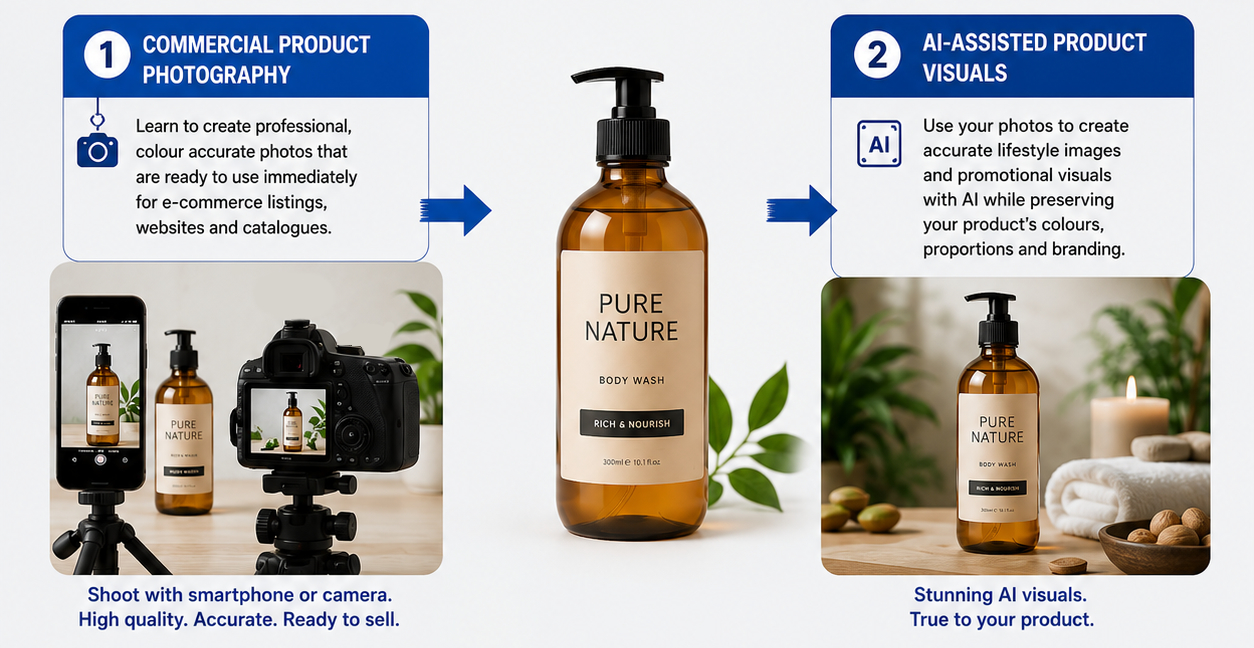
Workshop pathway
Learn the complete visual creation process.
The course combines interactive presentations, equipment handling and setup, guided practice, quizzes, reflection time, coaching and feedback. Participants also complete a capstone project and present their finished product visual portfolio. Around 70% of the learning is hands-on.
Commercial Product Photography
Set up a tabletop shoot, control light, choose the right angle, photograph your product, edit the images and select the strongest shots for commercial use.
AI-assisted Product Visuals
Use your product photos as references to create lifestyle scenes and promotional visuals with AI while maintaining colour, proportion and brand consistency.
Certificate of Completion
2-Day Hands-on Training
In-person Classroom Course
No Exam, No Stress
Course modules
Practical skills for real products and real campaigns.
The modules move from camera fundamentals to AI-assisted marketing production, ending with a workplace capstone portfolio.
Commercial Product Photography Fundamentals
Buying decisions, visual design, composition, product image types and common mistakes.
Product Photography Techniques
Equipment, camera setup, tabletop studios, lighting, reflectors, diffusers and angles.
Practical Product Photography
Photograph your own products, receive feedback, improve shots and prepare AI references.
Photo Editing for Commercial Use
Cropping, straightening, white balance, exposure, contrast, colour and sharpening.
AI Image Creation Fundamentals
Prompting, reference images, preserving product identity and refining AI-generated images.
AI Marketing Visuals and Capstone
Create lifestyle images, promotional visuals and present a complete product visual portfolio.
You will produce
A finished visual portfolio you can explain and apply.
A clean main image suitable for e-commerce and marketplace presentation.
Supporting images that show angles, features, textures and important product details.
AI-assisted scenes that place the product in attractive, relevant use contexts.
A marketing-ready visual designed for campaigns, launches or social media.
Who should attend
Built for teams who create or manage product visuals.
Suitable for e-commerce executives, digital marketing executives, marketing teams, social media teams, retail operations, corporate communications, sales and marketing professionals, business development executives, SME owners and entrepreneurs.
E-commerce Executives
Digital Marketers
Marketing Executives
Social Media Teams
Retail Operations
Corporate Communications
SME Owners
Entrepreneurs
Register your interest
Interested in joining the September 2026 workshop?
Send us your details and we will follow up with availability, payment instructions and any course questions you may have.